A musical idea can begin anywhere.
You might have a melody stuck in your head, play a few notes on the piano, or write something quickly on paper. But once you have an idea, how do you turn it into a clean score that you can hear, edit, and share?
That is where music notation software can help.
These programs do not compose the music for you. They help you place your ideas on a staff, listen to them, make changes, and prepare the music for performers.
Start with the Musical Idea
Before opening any software, you need something to write. It might be a melody, a rhythm, or just three notes.
For example, three notes could be:
E – G – D
You could first play it on an instrument or write it on paper. Then you can move to the computer.
Choose Your Instrument
When you create a new score, the first thing you do is choose what instrument your music uses.
If you are composing for piano, choose keyboards, then piano. If you are writing for violin, flute, cello, trumpet, or another instrument, choose that instead by first finding its category (ex: violin and cello are in strings, flute is woodwinds, and trumpet is brass).
The software then prepares the staff or staves needed for that instrument.
For example, a violin normally uses one staff, while piano music usually uses two because piano involves both of our hands.
Choosing the instrument is important because different instruments have different sounds, ranges, and ways of reading music.
Put Your Notes on the Staff
Enter that melody:
E – G – D
Notation software allows you to place those notes directly onto a musical staff.
Depending on the program, you are able to enter notes with a mouse, computer keyboard, touchscreen, or MIDI keyboard.
Once the notes are entered, your musical idea begins to look like a real score.
Listen to What You Wrote
One of the most useful features of notation software is playback.
After entering your notes, press play.
Maybe:
E – G – D
sounds exactly the way you imagined.
Or perhaps you want to experiment. You could change one note:
E – A – D
Then listen again.
Ask yourself: which version do you prefer?
This is one of the advantages of composing with software. You can quickly:
write → listen → change → listen again
The computer helps you test your ideas, but you still decide which version belongs in your piece.
Writing for More Than One Instrument
I briefly mentioned before that a composition does not have to be written for only one instrument. Notation software also lets you create music for several instruments at the same time. For example: Piano + Violin or Flute + Violin + Cello or even a Full Orchestra. Many songs involve several instruments, just like a team involves different people.
Each instrument has its own staff. All of those staves appear together in the complete score, allowing the composer to see how the different parts fit together.
You might let a violin play the melody while the piano plays supporting notes underneath. Or one instrument might supplement a musical idea played by another.
This makes notation software especially useful when writing chamber music, band music, or orchestral music.
Add More Than Notes
A finished score contains more than pitches. Structuring the rhythm is important as well.
And once the melody is working, you can add musical details such as:
- dynamics — how softly or loudly to play,
- tempo — how fast the music should go,
- articulation — whether notes should sound smooth, short, accented, and more,
- instrumentation — which instrument should play each musical idea,
- phrasing — how musical ideas are grouped.
These extra details are what makes music musical.
Different Programs, Similar Goal
There are several well-known programs for writing music.
MuseScore Studio: It is free and open-source notation software. It can be used for music ranging from simple solo pieces to larger ensemble scores. It includes playback and supports common formats such as MIDI and MusicXML.
Sibelius: It is made by Avid, is professional notation software used for composing, arranging, preparing scores, and creating individual instrument parts. It also offers Sibelius First, a simpler free version for beginners.
Dorico: It is made by Steinberg, is another modern notation program. Its free version, Dorico SE, is designed for smaller scores, while the larger versions can handle much bigger ensembles and professional publishing.
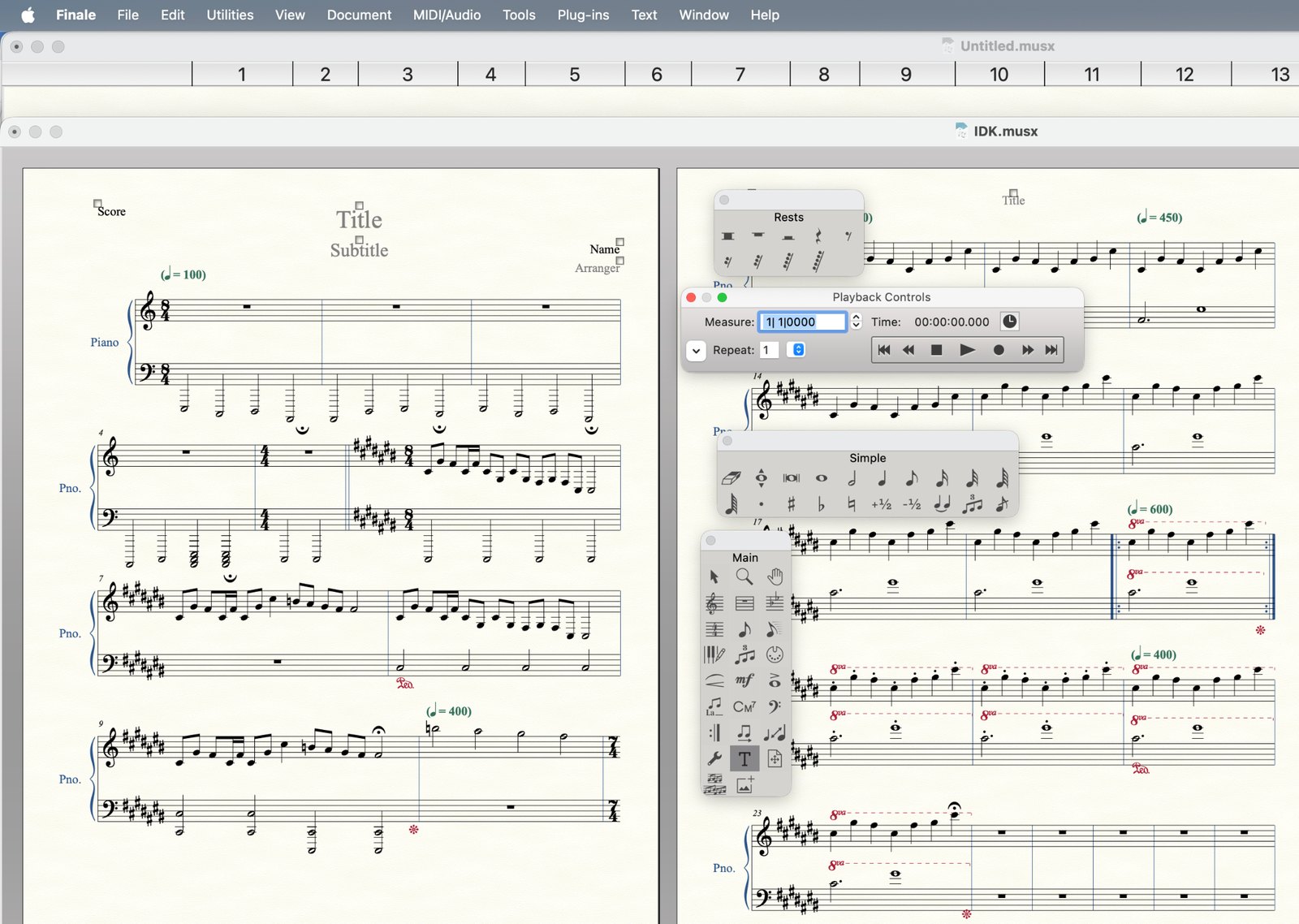
Finale: It was one of the most widely known music notation programs for many years. Composers, arrangers, teachers, and publishers used it to prepare scores for solo instruments, ensembles, bands, and orchestras.
Finale is also the notation software I use for my own compositions, so it is the program I know best.
It is true, however, that MakeMusic ended sales and further development of Finale in 2024. However, existing users like me can still have access to installed or older versions.
From a Draft to a Finished Score
Once your composition is finished, notation software can help turn your draft into something other musicians can use.
You can amend the composition such as:
- correct wrong notes,
- improve spacing and page layout,
- add dynamics and tempo markings,
- create separate parts for each instrument,
- listen to the finished piece,
- and export the score as a PDF.
A PDF is especially useful because the score will keep the same layout when you print it, email it, upload it, or send it to a performer, so they can receive the instructions of how to play this song.
Some programs can also export audio, MIDI, and MusicXML files.
Each format has a different purpose. A PDF is useful for reading and printing the score. Audio lets someone hear the music. MIDI and MusicXML can help move musical information between different programs.
A typical composition workflow might look like this:
Idea → Choose Instruments → Enter Notes → Listen → Revise → Add Details → Export as PDF → Share
The Computer Is a Tool
Music notation software can make composing easier.
It can help you hear ideas, fix mistakes, experiment with instruments, and prepare a clean score.
But it does not decide what your music should become.
The computer cannot decide whether:
E – G – D
is better than:
E – A – D
That decision belongs to the composer.
The software helps you write and hear the music. The musical ideas are still yours.
References
- MuseScore. (2026). “MuseScore Studio.” Official Website.
- Avid. (2026). “Sibelius.” Official Website.
- Avid. (2026). “Music Composing in Sibelius.” Avid Resource Center.
- Steinberg. (2026). “Dorico: Music Notation Software.” Official Website.
- Steinberg. (2026). “Dorico SE: Free Music Notation Software.” Official Website.
- MakeMusic. (2024). “MakeMusic Sunsets Finale, Announces Partnership with Steinberg, Makers of Dorico.” MakeMusic.